

v:
nika check, nika run, nika doctor, nika lsp,
and nika mcp ship in the binary. Run nika init once per repo for schema
and agent rules. Install Nika first if you
have not.1. Write the file
Createhello.nika:
hello.nika
nika: <name>is the mark and the workflow’s kebab-case identifier.model: mock/echoneeds no key and no server — the engine echoes the prompt back. The mechanics are real; the “answer” is a rehearsal.permits: {}declares zero authority up front. A workflow that later touches a file, a host or a shell must say so here, or admission refuses it.max_tokenscaps the answer’s length.outputs:names what the run hands back.
2. Check it, then run it
permits {} · est out ≤$0.0000 · 0 hints · risk low), then:
nika check catches broken references, missing dependencies and schema
problems before any model is called, and points at the exact fix. The run
wrote a hash-chained journal under .nika/traces/. Verifying that exact
journal — nika trace verify .nika/traces/2026-09-19T13-20-21Z-06c2.ndjson
— answered OK · chain intact and SEALED on this machine (exit 0):
tamper-evidence about the record, re-executing nothing. Verification
reports the evidence available to it; a missing run-signing key or a
mismatched receipt changes the verdict, not the run’s result.
3. Ask the file three questions
What if a required input is missing?
What if a required input is missing?
Declare
inputs: on the file and the run refuses to start without
them (NIKA-1708, exit 3) — admission fails, nothing half-executes.
Callers pass values with run(..., { inputs }) in the SDK or
--var key=value on the CLI.What if a permission is absent?
What if a permission is absent?
Admission refuses at check; the finding names the missing
permission. An absent
permits: block is zero authority
(NIKA-AUTH-006). A declared permits: {} that omits a reached
tool or path is NIKA-SEC-004 — the plate below. The file needs
both the named tool (nika:read) and the specific path
(./hello.nika). nika check --infer-permits drafts the
tightest block for you.What if I switch the model?
What if I switch the model?
One line.
ollama/qwen3.5:4b runs locally after
ollama pull qwen3.5:4b; a cloud provider takes its env key
(export OPENAI_API_KEY=...). The file, the check and the receipt
keep the same shape — only the answer changes. nika doctor reports
what your machine can reach.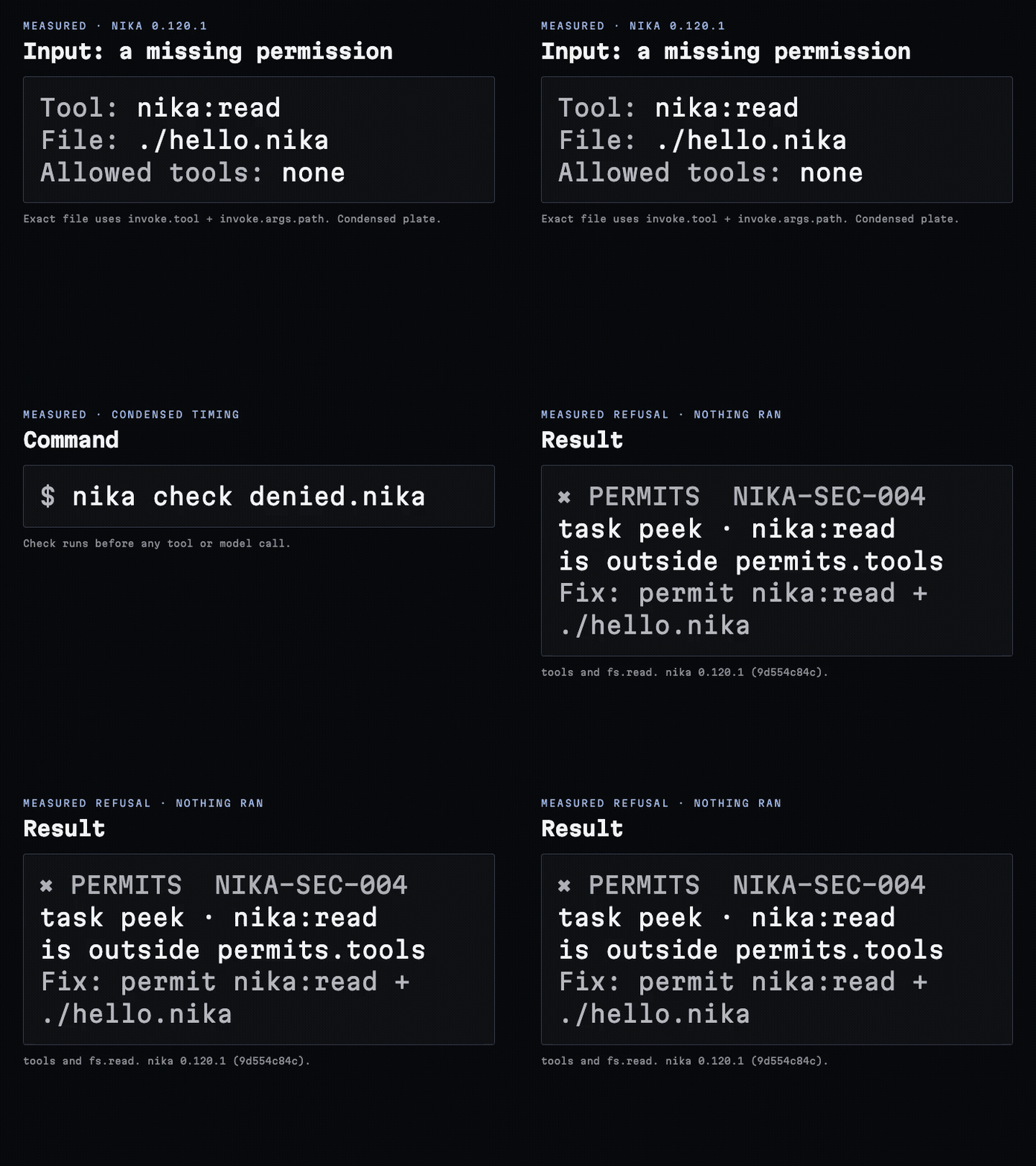
4. Add a second task that depends on the first
hello.nika
with: block is a binding: it names the data the
task consumes and declares the edge that orders it — greet → critique, one
declaration, no invisible edges. Tasks with no edge between them run in
parallel automatically. (For ordering without data — deploy after tests,
consuming nothing — use after: { tests: success }.)
5. Get structured output
hello.nika
nika run hello.nika --output json):
outputs: carries the declared shape — checked
when the model answers. A failed or refused run produces no output: the
guarantee covers shape, not outcome.
6. See a real job
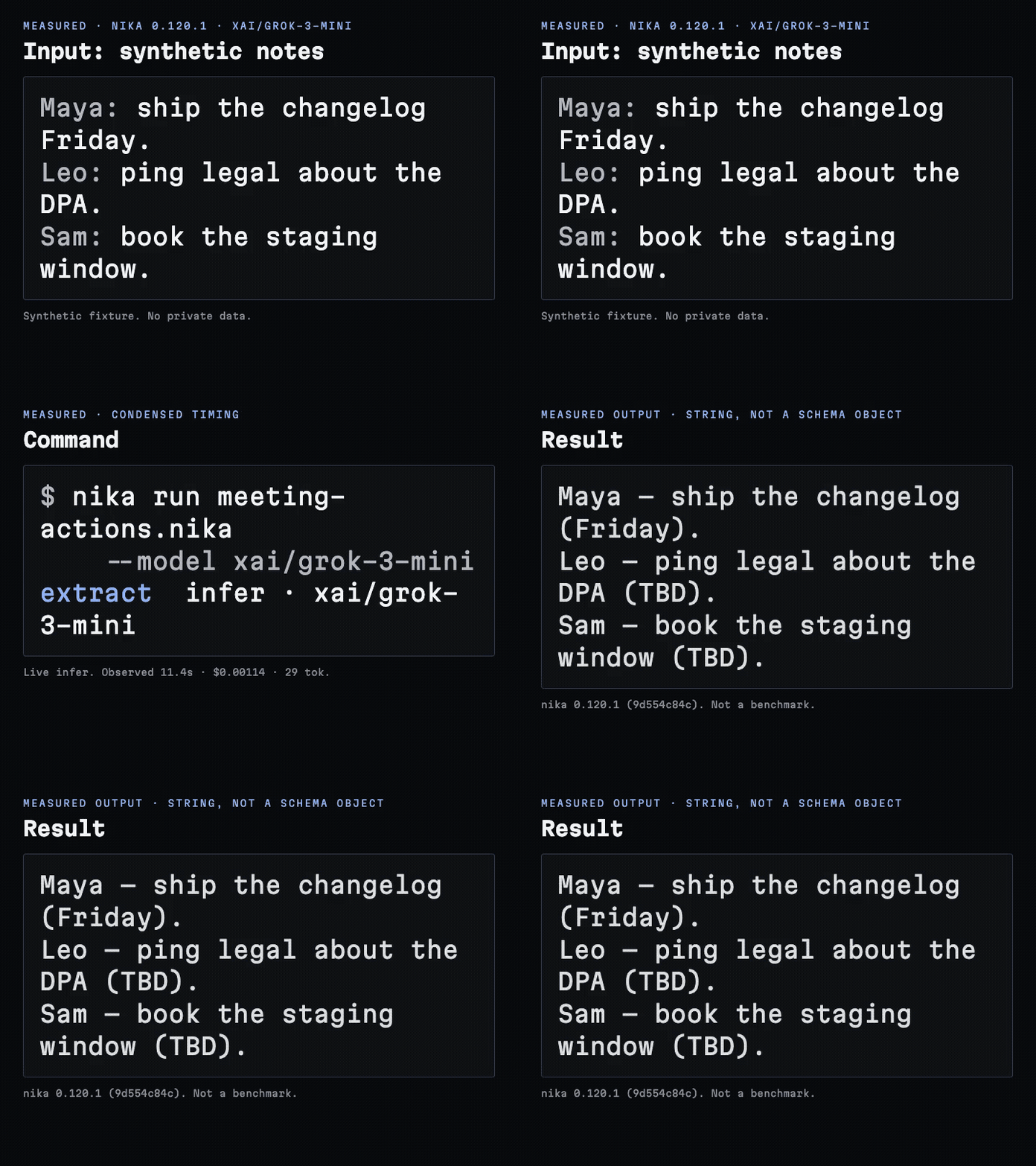
This short recorded demonstration turns synthetic notes into an action list usingxai/grok-3-mini. CLI 0.120.1, condensed timing.
The demonstration file has no typed schema, so the run exports a
string. The full meeting-actions
example declares {owner, task, due} and exports typed actions.
Download GIF
What you just built
- Workflows are YAML files:
.nika. - Tasks are units of work; the map key is the identity.
- Four verbs (
infer,exec,invoke,agent) define what each task does (HTTP fetch is thenika:fetchbuiltin underinvoke). with:(data) andafter:(control) build the DAG — the binding IS the edge.${{ tasks.X.output }}crosses a task boundary inwith:; the body reads${{ with.<name> }}.schema:checks AI output shape at answer time;outputs:exports the result.
Next lesson
1
Drive it from an app
SDK quickstart: the same file through
check → run → result → traceVerify in TypeScript.2
Inspect the DAG
nika inspect hello.nika (add --format mermaid|dot|json for the
machine projections); nika explain hello.nika narrates the waves and
the cost before a token is spent.3
Wire your agent
Run
nika wire cursor or nika wire all for explicit MCP setup, or
use the editor extension’s agent setup.Read next
Examples · real jobs
Starter chains to multi-step reports, every file runnable.
How to write Nika
The patterns of well-written Nika, each taught by a canonical example.
The 4 verbs
Deep dive on
infer, exec, invoke, agent.Bindings
How data flows between tasks with taint tracking.
Providers
Why one
InferRequest works across providers.Cost honesty
Read the cost report: floors, ceilings and honest « unpriced ».